

Tech Neck Treatment in Olivehurst: Screen Position and Symptoms
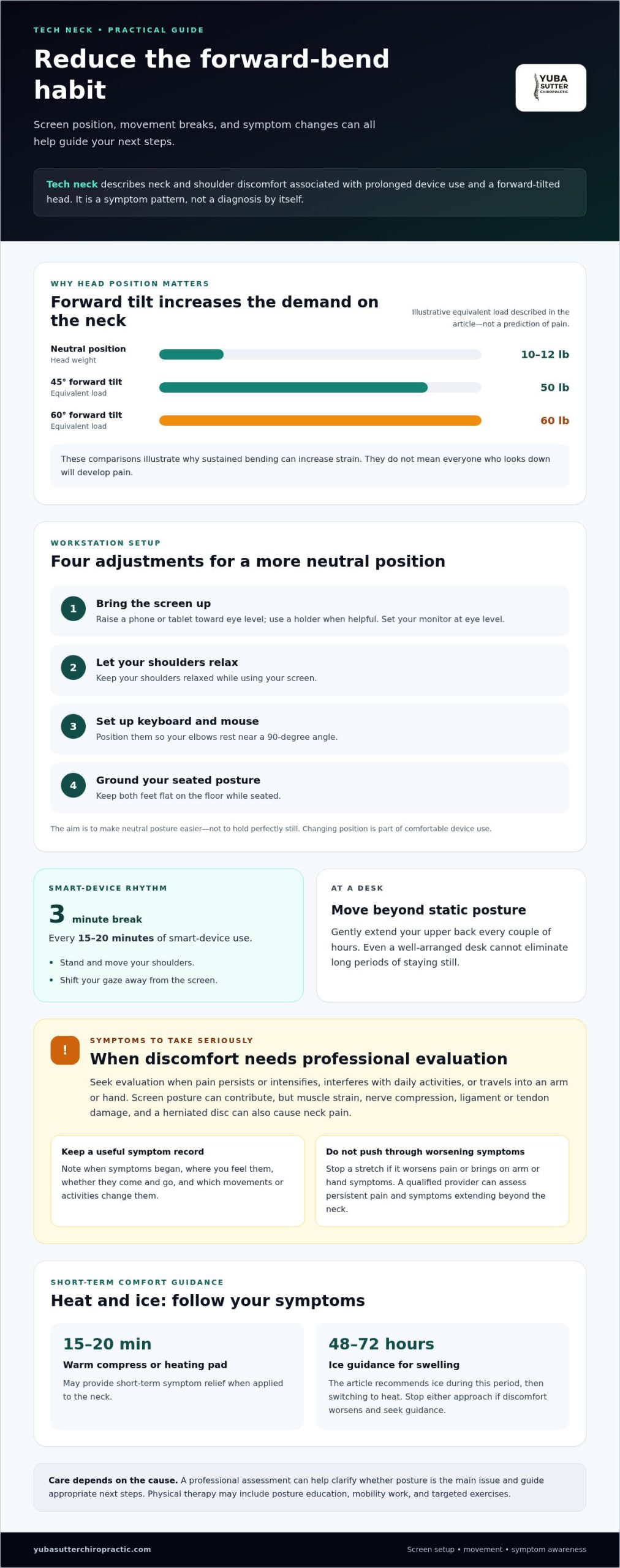
A phone habit can become a neck habit: tech neck describes neck and shoulder discomfort associated with prolonged screen use and a forward-tilted head. In a neutral position, the head weighs about 10-12 pounds; at a 60-degree forward tilt, the neck is described as supporting the equivalent of 60 pounds. If you’re considering tech neck treatment in Olivehurst, understanding how screen position may contribute is a useful first step.
Stiffness and soreness can be common, but pain that persists or worsens, or symptoms that travel into your arms or hands, deserve professional evaluation. Small adjustments, such as raising your phone toward eye level and setting your monitor at eye level, may help reduce the habit of bending your neck forward. This guide explains what tech neck is, what may contribute to it, and which symptoms merit attention. It can also help you decide whether to explore tech neck treatment in Olivehurst and what to discuss during a professional evaluation.
Key Takeaways
- Adjust your screen setup to encourage a neutral head position, and build regular movement into long stretches of device use.
- Tech neck can involve more than ordinary stiffness; notice whether discomfort is persistent, worsening, or spreading beyond the neck and shoulders.
- Screen posture is one possible contributor, but muscle strain, nerve irritation, and other causes can affect what care is appropriate.
- A professional evaluation can help identify the source of symptoms and guide next steps, including whether chiropractic care or physical therapy may fit.
- Learn which changes you can try at your desk and when symptoms call for more than self-care.
1. What is Tech Neck?
Tech neck is a common term for neck discomfort associated with prolonged device use and forward head posture. It isn’t a separate bone or a diagnosis by itself. Instead, the term describes symptoms that can develop when someone repeatedly holds their head forward or looks down at a screen. The cervical spine has seven bones, and its muscles help support the head as it moves.
Head position changes the demand on the neck. In a neutral position, the head weighs about 10-12 pounds. At a 45-degree forward tilt, the neck is described as supporting the equivalent of 50 pounds; at 60 degrees, that figure is 60 pounds. These comparisons illustrate why sustained bending can increase strain. They don’t mean that every person who looks down will develop pain.
Common symptoms include stiffness or soreness in the neck and shoulders. Some people notice tension after reading on a phone, working at a low laptop, or sitting through a long video call. Forward head posture may involve the ears sitting ahead of the shoulders rather than roughly aligned above them. Screen habits can contribute, but symptoms may have other causes, too.
Try these workstation adjustments to reduce prolonged bending:
- Raise a phone or tablet toward eye level, using a holder when helpful.
- Set the monitor at eye level and keep your shoulders relaxed.
- Position the keyboard and mouse so your elbows rest near a 90-degree angle.
- Keep both feet flat on the floor while seated.
These steps make a neutral posture easier to maintain. They don’t require holding perfectly still; changing position is part of comfortable device use.
Breaks matter because even a well-arranged desk can’t eliminate long periods of static posture. For smart-device use, a practical recommendation is a three-minute break every 15-20 minutes. Stand, move your shoulders, or shift your gaze away from the screen. At a desk, gently extend your upper back every couple of hours. Physical therapy may include posture education, mobility work, and targeted exercises when symptoms persist.
In California, coverage for physical therapy and other treatment depends on the specific health plan and its benefits. Plan terms may address provider networks, referrals, authorization, and covered services, so review your benefits for the treatment you’re considering.
Risks depend on the treatment and your symptoms. Stop a stretch if it worsens pain or brings symptoms into your arms or hands, and seek professional evaluation rather than pushing through.
3. Symptoms requiring professional evaluation
Neck and shoulder stiffness or soreness can follow long periods of looking down at a screen. These symptoms may ease when you change position, but persistent discomfort deserves attention. Tech neck describes a pattern, not a diagnosis, so the sensation alone cannot identify its cause. Muscle strain, nerve compression, ligament or tendon damage, and a herniated disc can also cause neck pain.
Notice how symptoms respond to everyday movement. Does turning your head, sitting at a computer, or using your phone make discomfort worse? Record when it began, where you feel it, and whether it changes during the day. This simple symptom history can help a qualified specialist understand which activities affect your neck and shoulders.
Seek professional evaluation if pain intensifies or persists, especially when it interferes with daily activities. Pain or other symptoms traveling into an arm or hand also merit attention. Stop a stretch if it worsens your pain or brings on arm or hand symptoms. Don’t force movement through those changes. A chiropractor, physical therapist, or other qualified provider can assess persistent pain and symptoms that extend beyond the neck.
Track specific changes rather than describing discomfort only as “bad.” Note whether symptoms are constant or come and go, whether one side feels different, and which movements affect them. For example, write down whether turning toward one shoulder brings on pain or discomfort reaches a hand while texting. These observations offer useful context during an evaluation.
Heat and ice may provide short-term symptom relief. A warm compress or heating pad can be applied to the neck for 15-20 minutes. For swelling, the guidance in this article recommends ice during the first 48 to 72 hours, then switching to heat. Pay attention to how your symptoms respond. If either approach makes discomfort worse, stop using it and seek guidance.
Professional care can help clarify whether screen-related posture is the main issue or another cause needs attention. Physical therapy may involve posture education, mobility training, and exercises for the neck and upper-back muscles. Treatment depends on the source of pain and the symptoms a provider observes. A careful assessment helps match next steps to your needs instead of relying on stretches alone.
If neck discomfort followed a collision or other vehicle-related injury, that history matters during evaluation. For ongoing symptoms or pain that travels into your arms or hands, consider arranging a professional neck symptom evaluation and share when symptoms began, what worsens them, and what you’ve tried.
4. Causes of tech neck
Tech neck often develops through repeated positions rather than one moment of looking down. Bending the neck 30 to 60 degrees to view a phone or tablet can place excessive strain on the muscles at the back of the neck and stress the cervical spine. The longer that position is held, the more sustained the muscular effort becomes.
Device placement can encourage forward head posture. A phone resting in your lap, a laptop on a low table, or a monitor below eye level draws the head forward and down. The shoulders may round as the upper back curves, changing alignment from the head through the torso. Repeating this setup during work, reading, and scrolling can contribute to tension or stiffness.
Duration and lack of movement also matter. A person may stay nearly still while answering messages, joining a video call, or reading several pages on a tablet. Muscles then work continuously to support the head instead of alternating between activity and rest. Changing position every 20-30 minutes can help interrupt prolonged static posture. Short movement breaks also give the neck and upper back a chance to move through different positions.
Desk habits can add strain even when the screen is at a useful height. A keyboard or mouse positioned too far away may encourage reaching, raised shoulders, or a forward lean. Check that your elbows rest near a 90-degree angle and your shoulders stay relaxed. Keep both feet flat on the floor, then adjust the screen so you can read without repeatedly lowering your chin.
Try simple movement practices as part of a screen routine, not as a substitute for evaluating persistent or worsening symptoms. A chin tuck can be held for 3 seconds and repeated 10 times, up to 3 sets per day. Scapular retractions can be held for 5 seconds and repeated 10-15 times. Stop an exercise if it worsens pain or causes symptoms in your arms or hands.
Workstation changes and exercises address different contributors. Raising a monitor changes the position that prompts forward bending; gentle mobility work adds movement after stillness. Five minutes of thoracic mobility each day is one suggested practice. If discomfort continues despite changes to device use and posture, an evaluation can help identify whether muscle strain, nerve compression, or another cause is involved.
5. Definition of tech neck
“Tech neck” is an informal term for neck discomfort associated with repeated screen use and forward head posture. It describes a pattern of symptoms, not a formal diagnosis or a single damaged structure. For example, someone may feel neck and shoulder tightness after reading on a phone with their chin lowered. The term suggests a possible connection between device habits and discomfort, but it doesn’t identify the cause by itself.
The cervical spine is the neck portion of the spine and consists of seven bones. Muscles and other tissues support head movement in this region. Holding the head forward during long periods of screen use can make the neck muscles work differently than they do in a more neutral position. A phone held near the lap and a low-positioned laptop are everyday examples of setups that may encourage repeated bending.
Neck pain associated with screen use can feel like soreness, stiffness, or tension around the neck and shoulders. Symptoms may appear during a work session, after scrolling, or later in the day. The label “text neck” is sometimes used for a similar pattern linked to looking down at a phone. Neither term tells you whether the source is muscle strain, a nerve issue, or another condition.
That distinction matters when considering care. A professional evaluation considers how symptoms behave, which movements affect them, and whether discomfort travels into an arm or hand. Physical therapy may include posture education, mobility training, and targeted exercises. The appropriate approach depends on the cause of the pain, not the everyday name attached to it.
For general movement between sitting periods, gentle options can include:
- Shoulder rolls to move the upper body after a screen session.
- Neck side bends, kept gentle and within a comfortable range.
- Slow neck rotations rather than forcing a stretch into pain.
- A short walk to change position and move beyond the desk.
Light stretching in the morning and evening is one suggested habit. If a movement worsens pain or brings symptoms into your arms or hands, stop that exercise and seek evaluation. You can also pause briefly to notice your posture: check whether your head has drifted forward, then reposition your screen or change how you’re sitting. These observations can help describe your habits during a therapy assessment without treating “tech neck” as a complete explanation.
5. Which providers near Olivehurst treat tech neck, including physical therapists and chiropractors?
In Olivehurst, physical therapists and chiropractors are among the providers who may evaluate persistent neck discomfort associated with screen use. A physical therapist can assess movement, explain posture adjustments, and prescribe strengthening exercises or home stretches. A chiropractor can evaluate neck symptoms and discuss care options based on the findings. The right starting point depends on your symptoms, how they affect daily tasks, and whether pain travels beyond the neck.
Physical therapy may be useful when limited movement, posture habits, or muscle weakness need attention. Treatment can include posture education, mobility training, and exercises for the deep neck flexors and upper-back muscles. For example, a therapist may assess how your neck moves as you turn toward each shoulder, then tailor exercises to support that movement. The plan may also address your desk setup and the positions you use while texting.
A chiropractor can assess neck pain, stiffness, and related symptoms, then discuss an appropriate approach to care. Share whether discomfort began during desk work, appeared after a long drive, or followed an injury. Also describe symptoms that travel into an arm or hand. This information can help distinguish a local posture-related complaint from symptoms that may involve nerves or another cause.
To prepare for an appointment, write down a few practical details:
- When the discomfort began and whether it is getting worse.
- Which activities, such as laptop work or phone use, affect symptoms.
- Whether pain or other symptoms spread into your arms or hands.
- Which movements or stretches help, worsen symptoms, or make no difference.
These observations give a provider useful context beyond the label “text neck.” If stretching worsens pain or brings on arm or hand symptoms, stop the exercise and mention the change during your evaluation.
Persistent or severe pain deserves professional attention, especially when symptoms limit work, sleep, or ordinary movement. Physical therapy and chiropractic care may involve different assessment and treatment approaches; the cause of symptoms and examination findings help guide care. A provider may also recommend a medical evaluation when symptoms suggest the problem needs assessment beyond routine posture-related care.
If you’re in Olivehurst and ongoing neck symptoms are affecting daily movement, schedule a neck-care evaluation to discuss what you’re experiencing and possible next steps.
Yuba Sutter Chiropractic & Wellness: Auto Injury Relief
Yuba Sutter Chiropractic & Wellness offers Chiropractic Care for people seeking evaluation of neck discomfort and related movement concerns. If your symptoms began after a vehicle collision, its Auto Injury Relief service may be a relevant next step. Share when the pain started, what movements affect it, and whether symptoms travel into your arms or hands. This history helps guide a conversation about your concerns and appropriate care.
DRX9000 Decompression is offered for herniated discs and sciatica, conditions that require assessment rather than assumptions based on screen-related soreness. A professional evaluation can help distinguish everyday posture-related discomfort from symptoms connected to another cause. For persistent neck pain, contact Yuba Sutter Chiropractic & Wellness to discuss your concerns, or visit yubasutterchiropractic.com.
Take the Next Step Toward More Comfortable Screen Habits
Make your next step practical: notice which screen habits leave your neck uncomfortable, then record what changes your symptoms. That information can help guide a focused conversation about care. If discomfort persists, affects daily movement, or began after a collision, professional evaluation can help clarify what may be contributing and what options fit your needs. For tech neck treatment in Olivehurst, Yuba Sutter Chiropractic & Wellness offers Chiropractic Care and Auto Injury Relief. DRX9000 Decompression is another available service for herniated discs and sciatica, which require an assessment of their own rather than an assumption that screen posture explains every symptom.
Bring your symptom notes and questions to the conversation, including what activities worsen discomfort and whether symptoms travel into your arms or hands. A clear account of your experience can help you take an informed next step. Contact Yuba Sutter Chiropractic & Wellness to discuss your concerns and move forward with care.
Frequently Asked Questions
What is Tech Neck?
Tech neck is a nickname for neck discomfort associated with repeated device use, especially habits that keep the head tilted forward. It describes a symptom pattern, not a specific diagnosis. For example, someone might feel tightness after reading messages on a phone during a commute. The term alone can’t show whether symptoms come from muscle strain, a disc issue, or another cause.
What can be done to get rid of the pain?
Start by changing the activity that seems to trigger discomfort. Move the screen, vary your position, and take a short walk instead of continuing through worsening pain. Keep a simple note of what you were doing and which movements affect your symptoms. If pain persists, intensifies, or spreads into an arm or hand, arrange professional evaluation rather than relying only on home care.
What exercises or treatments do you use and recommend to get rid of it?
Gentle mobility and strengthening exercises can be part of care, but the selection should match your symptoms and ability to move comfortably. One option described for chest tightness is a doorway pectoral stretch held for 30 seconds. Don’t force a stretch or continue if pain worsens. Physical therapy may include posture education, mobility training, and exercises for neck and upper-back muscles.
What role does the continuous use of smartphones and tablets aggravate it?
Long, uninterrupted device sessions can keep the head and shoulders in one position while the neck muscles support the head. Repeatedly reading, scrolling, or typing without changing position may contribute to muscle fatigue and discomfort. Break up a continuous session by setting the device down, standing, and moving before returning to it. A holder can also reduce the need to look down while reading.
Why does this happen now more than before?
Phones and tablets make screen use easy to fit into work, travel, and downtime, so people may look at devices in more settings. The first iPhone was introduced in June 2007, adding another handheld screen to everyday routines. The relevant factor isn’t the device’s age; it’s repeated positioning and long periods of use. A laptop balanced low on a couch is one familiar example.
What treatments are available for tech neck?
Options may include changing workstation habits, guided exercises, physical therapy, chiropractic care, and massage. A warm compress or ice may also offer temporary comfort, depending on your symptoms. These approaches serve different purposes: movement and posture work address daily habits, while a provider evaluates ongoing pain and possible causes. Symptoms that worsen or travel into an arm or hand call for professional assessment.
What exercises and posture changes help reduce tech neck?
Pair a posture adjustment with an existing routine: before a video call, check that your screen is easy to view and your shoulders feel relaxed. Between calls, try gentle shoulder rolls or a short walk instead of holding one position. A movement break is also a chance to notice whether symptoms change. Stop any exercise that worsens pain or triggers arm or hand symptoms.
How do physical therapy, chiropractic care, massage, and cosmetic treatments compare for tech neck?
Physical therapy can offer movement education and targeted exercise; chiropractic care provides a different clinical approach to evaluating and managing musculoskeletal concerns. Massage focuses on soft-tissue comfort, while cosmetic treatments address appearance rather than device habits or movement patterns. These options aren’t interchangeable. Persistent pain, worsening symptoms, or discomfort spreading into an arm or hand deserves evaluation to identify the concern before choosing an approach.